LegOS Network Protocol (LNP), which is included in the BrickOS Kernel,
allows for communication between BrickOS powered robots and host computers.
The communication is realized by the infrared ports. Therefore, first of all
make sure that there are no obstacles between two
communicating RCX bricks to prevent communication errors. For the purpose of
this course there have been made adjustments and modifications in order to
make the communication between RCX bricks and between RCX bricks and the host
computer a lot easier.
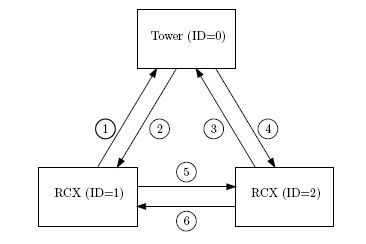
A possible configuration of a communication setup is depicted in the figure
above. It contains two RCX bricks and one host computer equipped with the
Lego USB Tower. Each client has its own identification number. The host
computer is identified by ID = 0. The two RCX bricks are identified by ID = 1
and ID = 2. The arrows indicate all the possible ways to communicate between
the three clients in this setup.
This communication setup is implemented by the "com" communication library which can be used by including its interface file
#include "com.h"
The communication library makes it possible to send and receive integers or arrays of integers. The main functions in this file are called init_com and com_send.
To activate the communication on the brick you have to initialize the communication library. The initialization of this library is done by calling the init_com function with as parameter the identifier ID of the current piece of communication hardware (that is one of the two bricks or the pc). E.g. starting the communication library for brick 2 is done by :
int ID=2;
init_com(ID);
Next to setting the communication ID the init_com function also starts a communication thread to handle incoming communication messages by setting global variables. However this thread runs within the library and is of no concern for the user of the library. The user of the library only has to deal with the global communication variables (see more below).
The main function to send integers is com_send. Syntax
int com_send(int IDs, int IDr, int message_type, int *message)
Arguments
Description Call com_send to send an integer from the sender with ID = IDs to the receiver with ID = IDr. The message that has been send has a message type. There are seven message types:1 to 7. Each message type is coupled to a global variable:
These global variables can be read in all your functions, for example by calling TRIGGER1. Sending an integer with message type 1 will result in the adjustment of the global variable TRIGGER1 at the receiver side. Examples
/* declare and initalize a */
int a = 1;
/* examples of sending messages */
com_send(1,0,7,&a); (see communication line 1 in figure above)
com_send(2,0,7,&a); (see communication line 3 in figure above)
com_send(1,2,1,&a); (see communication line 5 in figure above)
com_send(2,1,1,&a); (see communication line 6 in figure above)
A description of the communication lines is shown in Fig. above. At communication line 1, the RCX with ID = 1 asks the coordinates from earth. The coordinates are returned at communication line 2 and are stored in the variable COORDINATES. At communication line 3 RCX with ID = 2 asks the coordinates from earth. The coordinates are returned at communication line 4 and are stored in the variable COORDINATES. The coordinates correspond to the pixel numbering of the figure above. To read the coordinates simple call COORDINATES[0] for the first coordinate, which is the x-coordinate of the lake that is most nearby. An x-coordinate of 0 means that the center of this lake is seen at outer left side of the screen of the camera. An x-coordinate of 320 means that the lake is seen at the outer right side of the screen of camera. COORDINATES[1] is the y-coordinate of the lake that is most nearby. An y-coordinates of 0 means that the center of this lake is seen at the bottom of the screen of the camera. An y-coordinate of 240 means that the center of this lake is seen at the top of the screen of the camera. So the screen can be compared with a matrix with a size of 320 by 240. The element (0,0) is the bottom left element of the screen / matrix. The element (320,240) is the top right element. A lake is found when the following relations are satisfies 0 < x-coordinate < 320 and 0 < y-coordinate < 240. COORDINATES[3] and COORDINATES[4] represent the x- and y-coordinates of the second lake. Finally COORDINATES[6] and COORDINATES[7] represent the x- and y-coordinates of the lake that is located most far away.
COORDINATES[2], COORDINATES[5], and COORDINATES[8] contain the colors of the three lakes. ( RED: 0, GREEN:1, BLUE:2)
Remarks :
Finally at communication line 5, the RCX with ID = 1 sends TRIGGER1=1 to RCX with ID = 2. The opposite is the case at communication line 6.
The task of the communication thread, started by the function init_com, is to constantly detect whether or not a message is received at the infrared port. If a message is received, the variables TRIGGER1, TRIGGER2, TRIGGER3, TRIGGER4, TRIGGER5, TEMPERATURE and COORDINATES are adjusted depending on the message type.
To prevent that two or more threads are writing the variables TRIGGER1, TRIGGER2, TRIGGER3, TRIGGER4,TRIGGER5, TEMPERATURE, COORDINATES at the same time, semaphores are used. For example, if another RCX brick is sending a message to adjust the variable TRIGGER1 and a thread running on this RCX brick is adjusting the variable TRIGGER1 at the same time. So if you want to change one of the variables TRIGGER1, TRIGGER2, TRIGGER3,TRIGGER4, TRIGGER5, TEMPERATURE, COORDINATES, semaphores should used. The init_com function in the communcation library does for this purpose setup a semaphore sem_com. This semaphore is initialized on 1 on startup, and is used as a mutex everytime in the library access is needed to the global communication variables TRIGGER1, TRIGGER2, TRIGGER3,TRIGGER4, TRIGGER5, TEMPERATURE, COORDINATES. So everytime you want to change on of these variables you cannot simply write
TRIGGER=0;
but instead it should be
sem_wait(&sem_com);
TRIGGER=0;
sem_post(&sem_com);
On the PC the coordinates of the found lakes are calculated by using the images of the camera mounted on the marsrover.
The software can be calibrated by setting the color threshold for red, blue and green for finding the respectively red, blue and green lake.