
The pickup system contains the following parts :
We use the parallel port LPT1
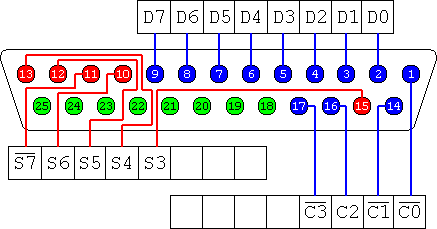
If in this document we talk about D2, we mean bit 3 of the data port (D0 is the first byte!!). In general we use Dx for bit x+1 of the data port, Sx for bit x+1 of the status port and Cx for bit x+1 of the control port. Sometimes a bar is put on top of the bit label which means that this bit is hardware inverted. Hardware inverted means that a bit value of 0 corresponds to a voltage of +5 Volt and a bit value of 1 corresponds to a voltage of 0 Volt on the the correspondig pin on the parallel port. So hardware inverted means that the translation from voltage to bit levels is inverted.
The pin layout of a 25 pins female D-type parallel port connector (green is ground (0 Volt)):
The data port can be set in a output or in a input mode. When set in output mode (the default ; C5=0) the normal usage of the port is to write values to it, to control attached devices like a buzzer or a magnet. This is the mode we use in the pickup. When set in input mode (C5=1) you can use this port to connect sensors to it and use the port to read out the sensor values. In this mode you cannot write values to the data port. Remark : the input mode is in fact a special mode and it is called in electronics the tristated mode of a TTL output port.
The status port is used to read out sensor data, and you cannot write values to it. In electronics the status port is specified as a TTL input port.
In our pickup system we use the S7 bit of the status port to read out if the press button is pressed or not. The parallel port of most pc's, and also in our case, has by default a high voltage on the status ports when nothing is connected. In the pickup system the status port gets grounded ( pulled to 0 Volt) when the press button is pressed. Thus for a normal status port we would read 0 for pressed and 1 for not pressed. However in the pickup system we use status bit S7 which is hardware inverted, so we get 1 for pressed and 0 for unpressed.
The control port is a different kind of port. Both the data and status ports are TTL ports, however the control is a so called open collector output port. I'm not going to explain the electronical difference between a TTL and a open collector output port. The only thing you have to know is that a open collector output can also be used as an input port by programming the output voltage by default high and let the sensor attached to the port let pull the voltage low when an sensed event happens.
For more information about the parallel port see the addon information of experiment 9 about interrupts and the parallel port.
Other good documents are :
One can monitor the parallel port on the windows pc using this program : lpt.exe
Sometimes the meaning of a bit is inverted. For example the bit S6 is in the parallel port documentation called nAck. In this name 'Ack' stands for 'acknowledged' and the 'n' stands for 'not'. So we can say that if the S6 bit is 1, the condition 'Ack' is 'not' true and when the bit is 0, the condition 'Ack' is true. Thus we can say the meaning of condition is inverted when an 'n' is placed in front of its name!! When a condition is true for a low signal we call this 'low active'. When a condition is true for a high signal we call this 'high active'.
In practice the S6 bit line is constantly kept high (1) by the interrupt port itself. When attached hardware pulles it down (0), and takes it immediately up again, and interrupt is created on the parallel port on the transition from low to high.
Thus an interrupt is only created by temporarely pulling the S6 line down, so we could call this line 'low active'!
A Flip Flop is a simple single bit memory cell. It has two inputs and one output. With the output one can read the value of this memory cell, and with the inputs one can Set or Reset the value of the memory cell
The Flip Flop used in the pickup is a so called NAND Flip flop which has the following coding of its actions :
When using this Flip Flop by default you set both inputs x1 and x2 to high, and only when you want to have a Set or Reset you lower the designated input. So we could say this Flip Flop has active low Reset and Set actions.
In the pickup experiment a hardware sensor is connected to the x1 input line, and a bit Dx of the data register is connected to the x2 input which has to be programmed default high. The output value is connected to bit Sx of the status port from which we can read it.
The hardware sensor is manufactured in a manner so that it is default high, and when it senses something it lowers the signal causing a Set action on the Flip Flop. After this event has passed the sensor will give again the default high signal, however the Flip Flop, which now has both input lines high, will still 'Hold' the value of the last 'Set' action which is high!
The output value stays high until the user lowers the input on the data bit Dx causing a reset action which set the output value low again. The user has to immediately set the Dx bit high again so that the sensor can cause a new Set action. ( both the sensor low and Dx low won't set the output value!!!)
Thus from the programmers point of view the hardware does the set action and we read the status port on some bit Sx if the memory cell is set or not, and when set, we reset it with a value inverted pulse (low active) to make it ready for the next event.
In our pickup system we did have only two time critical interrupt events : the light sensor and the rotation sensor. For these sensors we use interrupts so that we can quickly take action when an event happens.
Other not time critical values were just read out using a polling technique. However the pressure sensor is a special case in which you combine polling with a Flip Flop memory cell. The pressure sensor was not time critical to act on, so we didn't need to deal this with an interrupt. However the event itself (when the sensor is pressed) has such a short duration that it was impossible to correctly detect it when using polling on this sensor output value. Therefore we use a Flip Flop on the output of this sensor. When the sensor detects an event it sets the Flip Flop which the user can easily read out on a later time. After reading the user resets the Flip Flop for the next event.
The parallel port has only one interrupt line, thus when using x sensor each generating an interrupt the easiest way to deal with them is to use x nodes. So the easiest way to deal with the two interrupts we have in our pickup system is to use 2 nodes.
It is however possible to use the output value of sensor to both set an interrupt on a the interrupt line of the parallel port (S6) and set a Flip Flop which outputs to one of the status registers of the parallel port. In this manner one can combine the two interrupt sensor on the input line of a single parallel port and use the value of each Flip Flop's status bit to distinguish the two sensors. In other words when an interrupt happens one can look in the interrupt handler at the two status bits of the two sensors to see which one caused the interrupt!
The pickup system can be controlled in two ways :
In this setup we use 2 nodes with each node dealing with one interrupt. Node 1 deals with interrupts from the light sensor and node 2 deals with interrupts from the rotation sensor. The layout is as follows :
Node 1 (using cable 1 from the pickup)
Node 2 using (cable 2 from the pickup)
In the single node mode everything can be controlled from a single node. In this mode all the sensors and actuators are controlled in the same way as in the two mode situation except that